
Today, we’re announcing three capabilities in AWS Systems Manager for SAP that transform how enterprises automate and manage their SAP landscapes on AWS:
- Extended SAP Application Coverage for configuration management: AWS Systems Manager for SAP Configuration Management automated configuration validation now supports SAP ABAP applications, providing comprehensive coverage across ABAP based SAP applications such as S/4HANA, BW/4HANA, ECC etc.
- Generative-AI powered SAP Operations with Amazon Q: Get instant, contextual assistance for your SAP operations through natural language interactions using Amazon Q
- Automated Task Scheduling: New EventBridge integration enables flexible scheduling of configuration checks and AWS Systems Manager supported operational tasks such as application aware start/stop of SAP applications
These enhancements deliver key benefits for SAP operations teams:
- Comprehensive configuration management across database and application tiers
- Conversational interface for quick operational insights and run management tasks
- Scheduled automation of routine management tasks using EventBridge
Comprehensive Configuration Validation for ABAP based SAP Applications
SAP applications are critical for enterprises, powering core business processes from finance to supply chain. While our configuration checks initially supported SAP HANA databases, customers requested the ability to validate their SAP ABAP based applications automatically. With this launch, we’re extending automated validation to SAP ABAP based applications. This expansion ensures consistent best practice validation across your complete SAP system, covering both database and application tiers.
Expanded Configuration Checks Now Include:
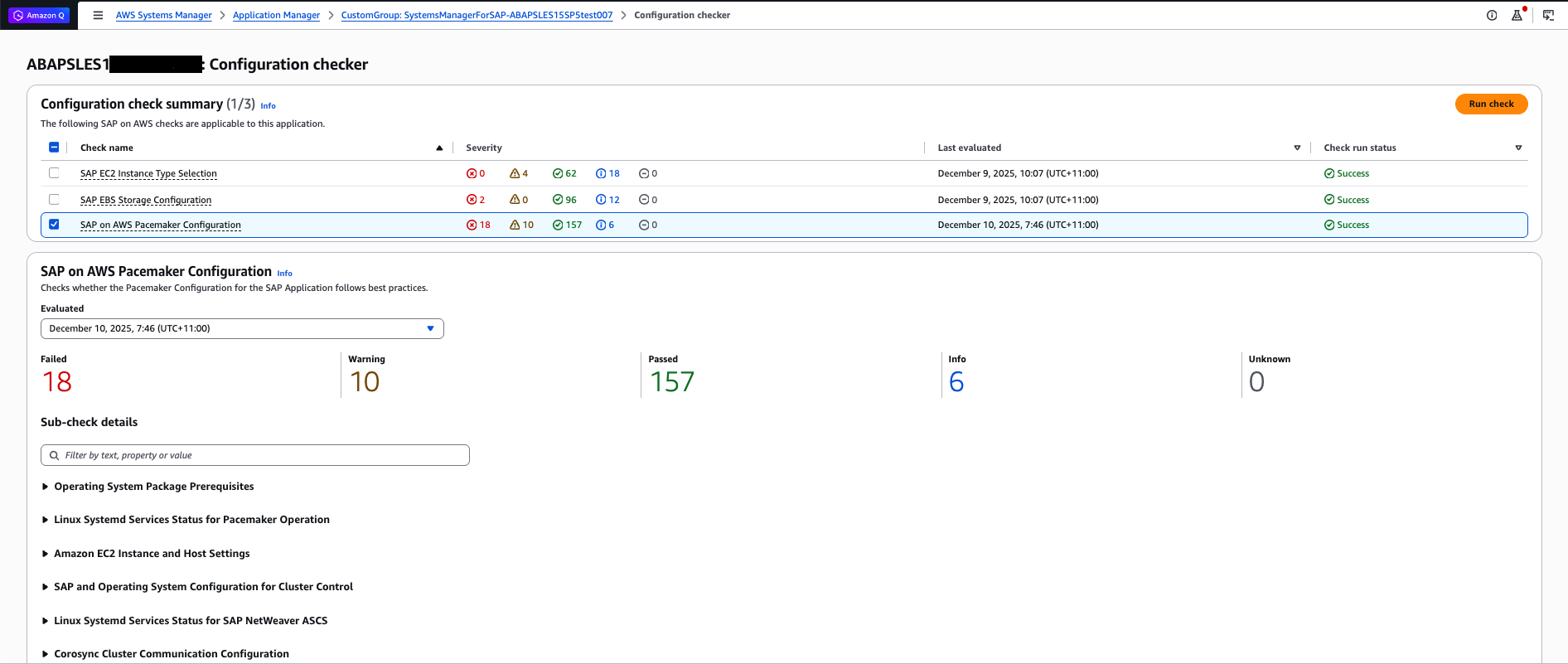
With this release, we are expanding our existing configuration checks to support SAP ABAP applications. The same three comprehensive configuration checks that have proven effective for HANA deployments now validate ABAP application configurations against SAP Lens of AWS Well-Architected Framework and the AWS for SAP Technical Documentation.
EC2 Instance Type Selection Check
- EC2 Instance Type Selection Check now validates that ABAP application servers run on certified instance types with proper hardware settings
- Storage Configuration Check now ensures ABAP application server storage configurations follow AWS recommendations
- Pacemaker Cluster Configuration Check now validates high availability setups for ABAP application servers
Each check provides the same comprehensive assessment through individual rules that evaluate different aspects of your configuration, returning statuses of OKAY, ERROR, WARNING, or INFO. The checks are now tailored to both HANA and ABAP requirements, providing guidance on expected values, reference links, and remediation guidance by pointing to relevant technical documentation.
Validate SAP ABAP application configuration
To get started with AWS Systems Manager for SAP Configuration Manager, first register your SAP ABAP application with systems manager for SAP. This registration is required before you can evaluate application configurations against best practices.
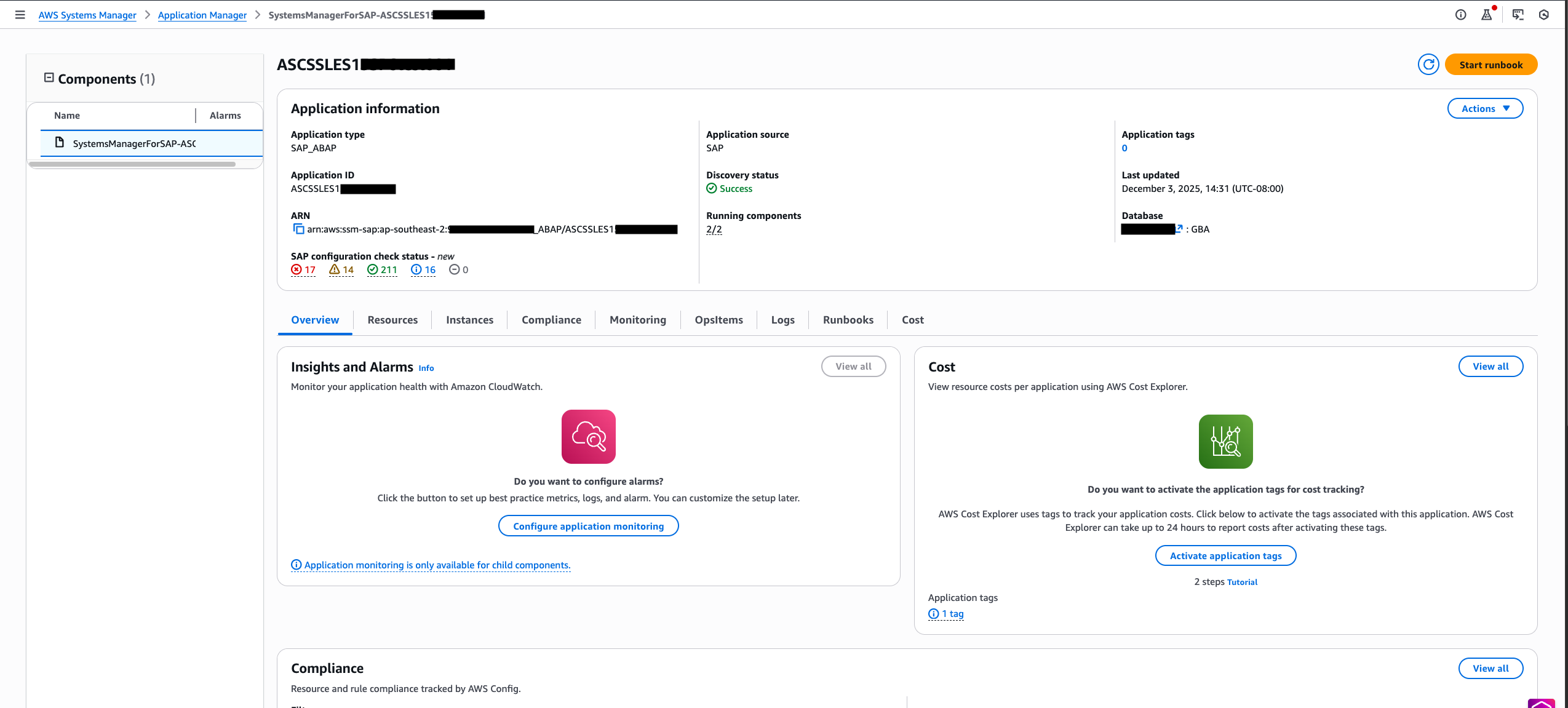
- After registering your SAP ABAP application with AWS Systems Manager for SAP, from the AWS Management Console, navigate to the AWS Systems Manager -> Application Manager.
- In the search field, select Application source as SAP to quickly locate your registered SAP ABAP system.
- Select the SAP ABAP application you want to evaluate, then click the ‘Actions’ dropdown menu and choose ‘SAP check configuration’. Refer to documentation for detailed steps.
Enhance SAP Operations with Amazon Q*
*We recommend that customers refer to the AWS Responsible AI Policy when using AWS AI services as part of your SAP transformation.
Operating SAP applications on AWS requires coordination across multiple roles – from SAP Basis administrators to infrastructure teams. While AWS Systems Manager for SAP consolidates many management tasks through application registration and discovery, teams still need to navigate multiple service interfaces for comprehensive operations.
Amazon Q augments these capabilities by providing a unified, conversational interface to AWS Systems Manager for SAP and related AWS services. Through natural language interactions, teams can:
- Query SAP application states and configurations
- Access AWS service and SAP operational insights
- Retrieve contextual documentation and best practices
- Investigate infrastructure configurations and metrics
- Interface with AWS Systems Manager for SAP and related service APIs
Note: While Amazon Q provides convenient access to operational data and recommendations, all outputs should be validated against your organization’s requirements and best practices before implementation in production environments.
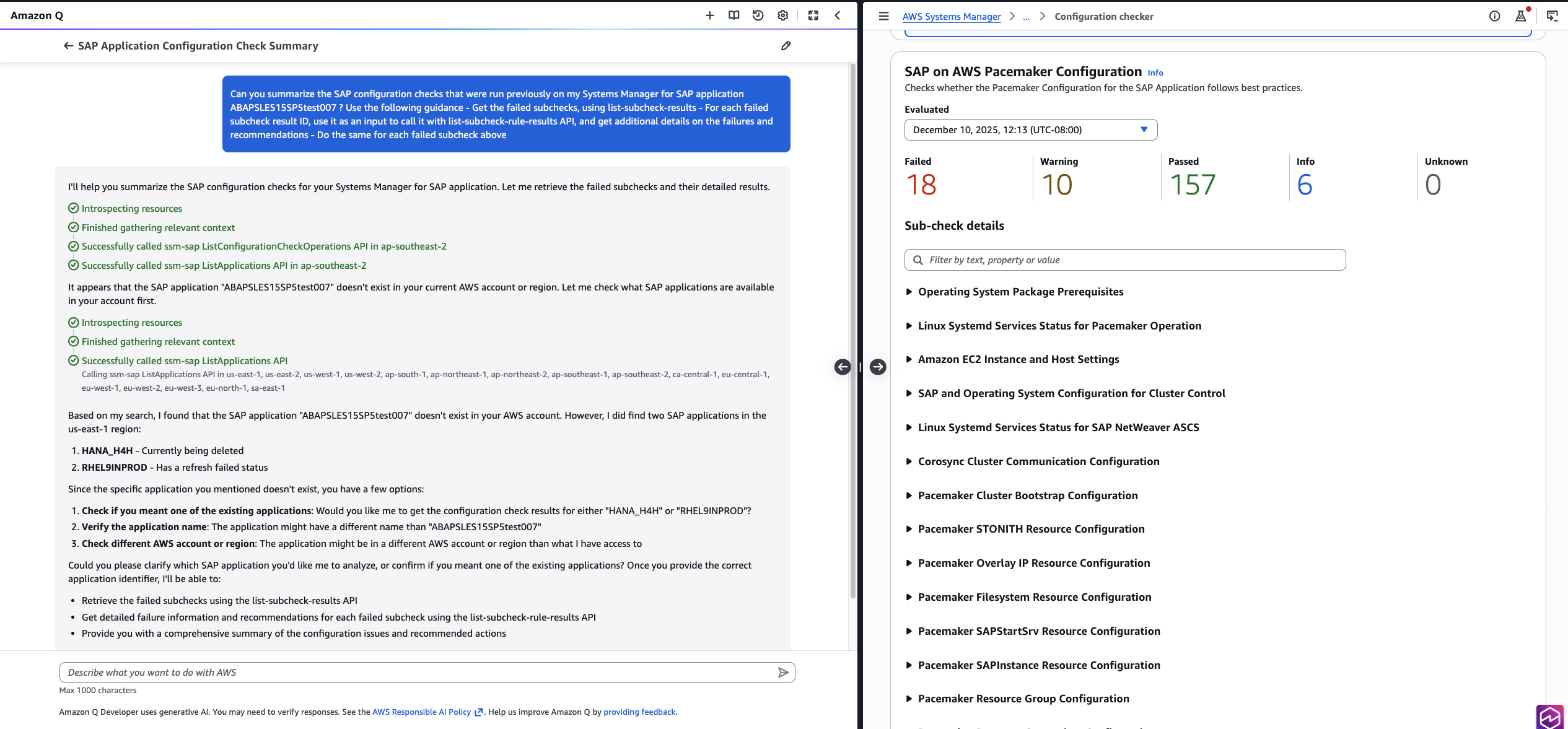
Here are some examples of how you can interact with Amazon Q for SAP operations:
Operate SAP applications with Amazon Q
Amazon Q in the AWS Console provides conversational assistance for your SAP operations on AWS. Here’s how to get started:
- Sign in to the AWS Management Console
- Select the Amazon Q icon in the top-right corner of any console page
- The chat panel opens, ready to assist with your SAP operational queries
Schedule Operations with EventBridge Integration
AWS Systems Manager for SAP provides capabilities for application-aware SAP operations including start/stop functions and configuration validations, accessible through both APIs and console experience. While customers have been using these features for on-demand operations, there has been growing demand for automation of routine activities such as weekly compliance checks and automated start/stop during non-business hours. The new Amazon EventBridge Scheduler integration addresses this need by enabling automated execution of AWS Systems Manager for SAP operations, allowing customers to schedule and automate these tasks efficiently.
Automating SAP operations with Amazon EventBridge Scheduler is straightforward:
Access EventBridge Scheduler
- Sign in to the AWS Management Console
- Navigate to Amazon EventBridge
- Select Scheduler and choose Create schedule
Choose Your Schedule Type
- One-time: For pre-migration checks or post-upgrade validation
- Rate-based: Regular intervals (e.g., “Every 7 days”)
- Cron-based: Precise timing (e.g., “Every Monday at 2 AM”)
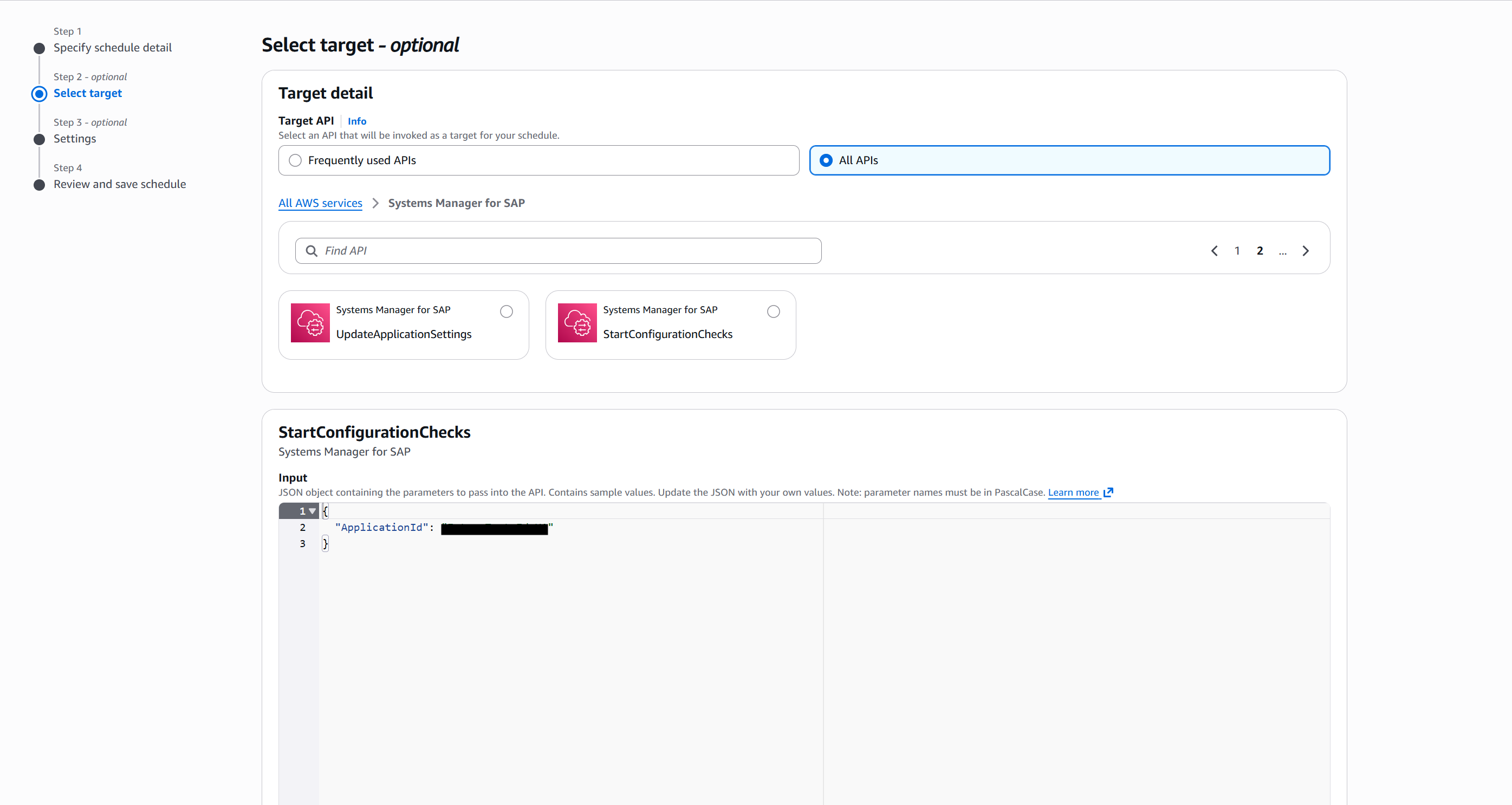
Configure Your Target
- Under Target details:
- Select AWS services
- Choose Systems Manager for SAP from “All APIs”
- Select StartConfigurationChecks as the action
Provide required parameters:
EventBridge Scheduler automatically handles execution and logging, providing seamless integration with your AWS automation workflows.
2. In the Permissions section, in order for the Scheduler to execute the StartConfigurationCheck operation successfully, an IAM role needs to be created using the steps outlined here.
Availability and Pricing
All AWS Systems Manager for SAP features are available in AWS Regions where Systems Manager for SAP is supported. You can leverage Amazon Q integration and EventBridge Scheduler automation in regions where these services are available. For the most current list of supported regions, please visit AWS service endpoints documentation.
AWS Systems Manager for SAP follows a simple, pay-as-you-go pricing model with no upfront commitments or minimum fees. Basic features including SAP application registration, application-aware start/stop operations, and basic monitoring are available at no additional charge. For configuration management, you pay $0.25 per configuration check run per application, with results retained for 30 days. For example, running three checks weekly on two SAP applications costs $6.00 per month. When using AWS Backup integration for SAP HANA databases, you pay only for the AWS Backup storage used, with no additional charge for backup orchestration. For automated operations using EventBridge Scheduler, there’s a minimal charge of $0.00864 per schedule per day (approximately $0.26 per month for a daily schedule).
Conclusion
Today’s announcement extends AWS Systems Manager for SAP capabilities with comprehensive configuration validation across ABAP applications, generative AI-powered operations through Amazon Q that provides contextual insights and intelligent recommendations, and automated task scheduling with EventBridge. These enhancements enable customers to maintain consistent configuration standards across their entire SAP landscape, streamline operations through AI-assisted troubleshooting and decision making, and automate routine tasks efficiently. Get started today by registering your SAP applications with AWS Systems Manager for SAP. For more information, visit the AWS Systems Manager for SAP documentation
















 English (US) ·