When moving from SAP ERP to SAP S/4HANA, one of the most significant changes in profitability analysis is the shift from traditional costing-based CO-PA to margin analysis (account-based CO-PA). Because cost elements are now integrated directly into G/L accounts and the Universal Journal, profitability reporting works differently than it did in SAP ERP. This post explains what changed and how margin analysis functions in SAP S/4HANA. Account-based CO-PA hasn’t been used that much in SAP ERP, as it was lacking a lot of functionality compared to costing-based CO-PA. Some users ran account-based CO-PA in parallel to costing-based CO-PA as it promised reconciliation of CO-PA with the general ledger (G/L), which wasn’t guaranteed. Account-based CO-PA was based on cost elements in SAP ERP. In SAP S/4HANA Finance, cost elements became integrated in G/L accounts. When creating a G/L account, you choose what type of G/L account you want to create. There are two G/L account types for cost elements: In this figure, you can see the G/L Account Type field in the General tab of G/L Account 00800000 Sales revenues-dom. When either Primary Costs or Revenue or Secondary Costs is selected from the G/L Account Type field, and the company code is assigned to a controlling area, then you’ll see the Settings in Controlling Area section in the Controlling Data tab, as shown in the figure below. The fields available in the section are the same fields that you maintained when you were creating a cost element: The cost element category defines the usage of the cost element. For both primary cost elements and secondary cost elements, there are different cost element categories. The G/L account is assigned to cost element category 11 for Revenues, which means this G/L account is transferred directly to profitability analysis when transferring a billing invoice. Postings with a cost element of cost element category 11 are only statistical and can’t be settled to another recipient. The Unit of Measurement must be maintained when the indicator to record the quantity is activated. This field determines in which unit of measure quantity can be recorded on the cost element. If this indicator is set, you can record quantities on the cost element during posting. Along with the cost elements, margin analysis also became integrated in the G/L. Margin analysis is fully integrated in the Universal Journal. It’s therefore reconciled by design. The internal and external views in accounting are harmonized and allow a comprehensive reporting with drilldown functionality in P&L statements as well as balance sheets to the lowest level of characteristics. Margin analysis can be structured in both cost of sales accounting and periodic accounting. The figure below shows a sample structure of traditional account-based profitability analysis or margin analysis. In the left half of the figure, you can see the cost elements that are replaced by G/L accounts in SAP S/4HANA Finance. The values correspond to the posted values on the G/L account. Much less configuration needs to be done in margin analysis than in costing- based profitability analysis. After margin analysis is activated, most transactions automatically get a profitability segment assigned. There are some functionalities that allow you to split costs in margin analysis or predict outcomes. The following lists what you need to remember from this blog post about margin analysis: Your deep-dive into margin analysis (formerly known as account-based profitability analysis) with SAP S/4HANA! Master value flows from sales and distribution, financial accounting, materials management, and controlling. Optimize reporting using summary reports, line-item reports, and SAP Fiori apps! Get access to course recordings by clicking the banner below. Editor’s note: This post has been adapted from a section of the book Margin Analysis with SAP S/4HANA by Kathrin Schmalzing. Kathrin is a partner at PwC who specializes in financials and controlling software implementations, business process analysis and transformation, and value flow analysis. This post was originally published in 2/2026.
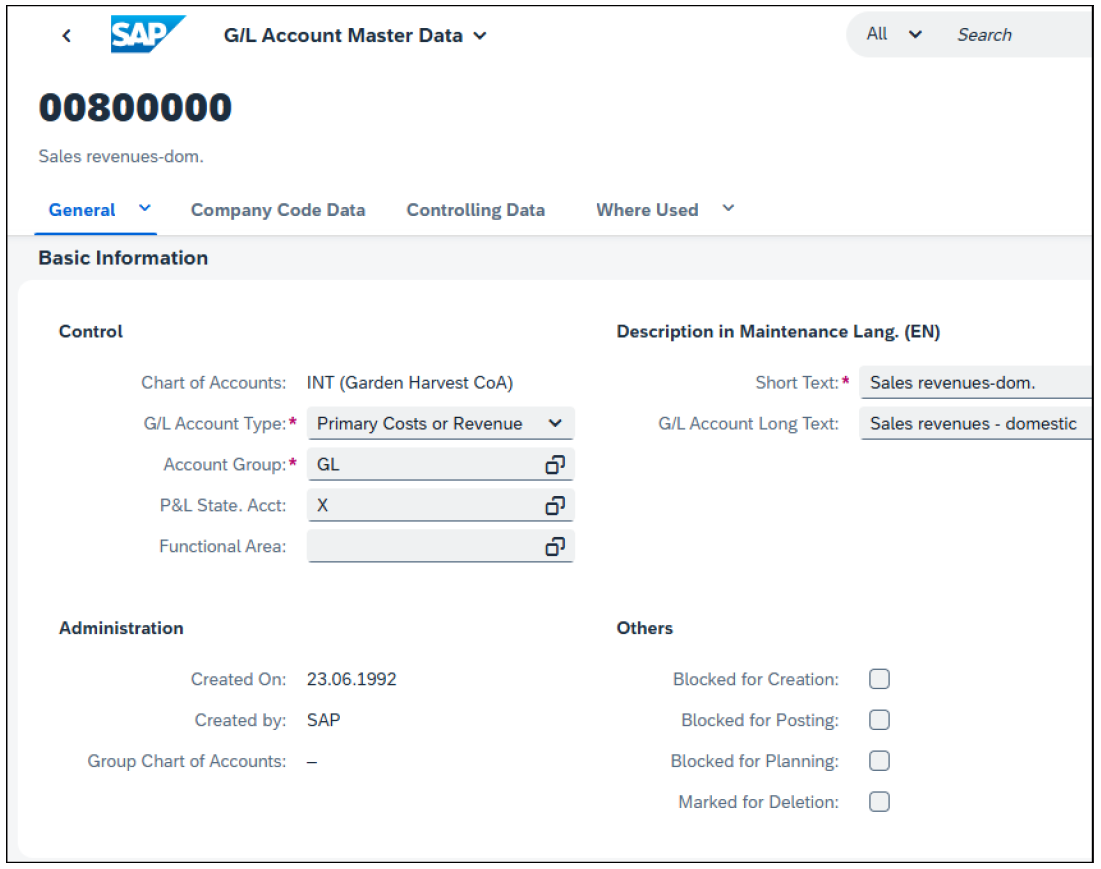
How to Define the G/L Account Type for Primary and Secondary Cost Elements in SAP S/4HANA
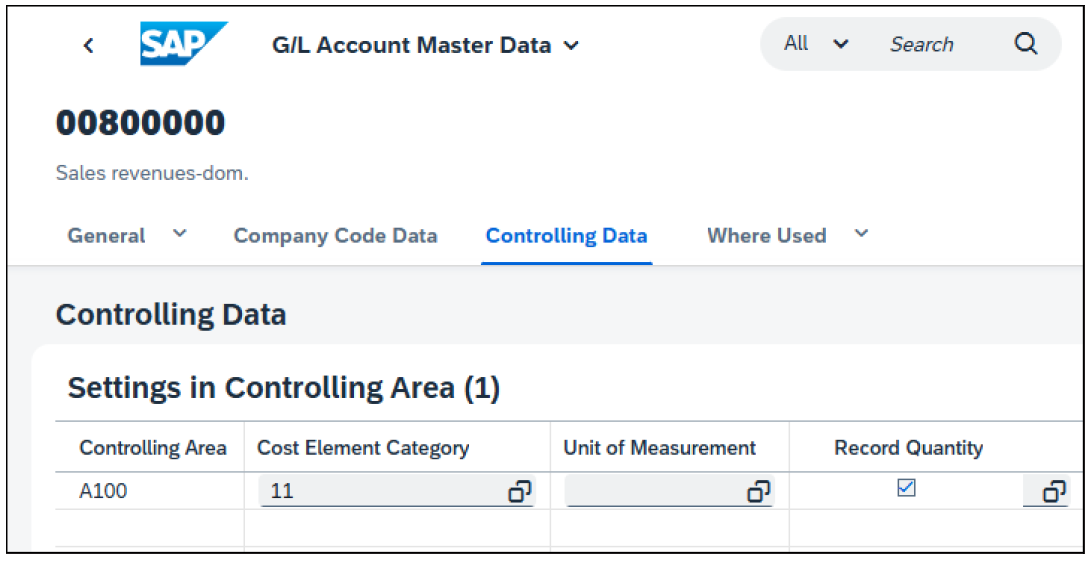
What Is a Cost Element Category in SAP S/4HANA and How Is It Used?
How the Unit of Measurement and Record Quantity Indicators Work in Cost Elements
Record Quantity
Structure of Account-Based CO-PA (Margin Analysis) in SAP S/4HANA
How Margin Analysis Is Integrated into the Universal Journal (ACDOCA)
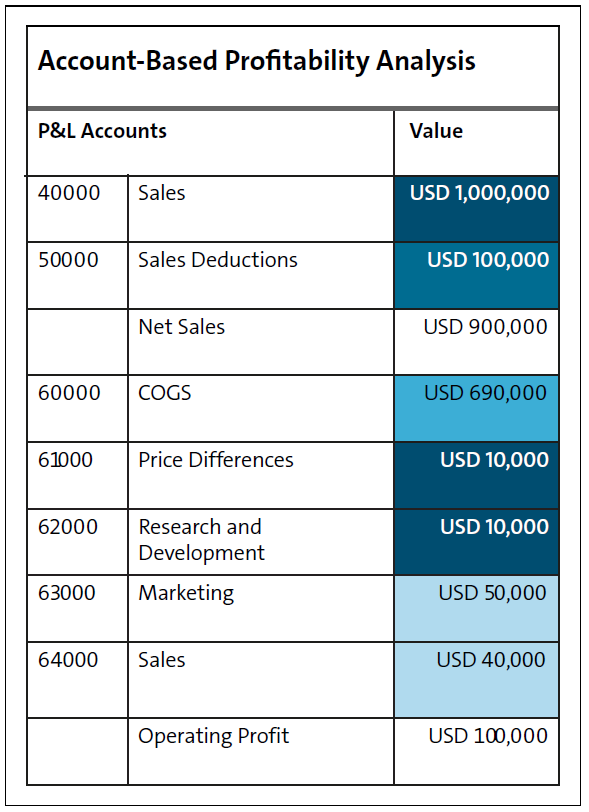
Configuration Requirements for Margin Analysis in SAP S/4HANA Finance
Key Takeaways for Activating Margin Analysis in SAP S/4HANA
Learn Margin Analysis in Our Rheinwerk Course!
Account-Based CO-PA in SAP S/4HANA: How Margin Analysis Works in the Universal Journal
 1 month ago
19
1 month ago
19
Related


How Classes Are Defined and Used in ABAP Objects
2 days ago
4


Popular

Joule Agents: Tender Analysis Agent | Demo
3 weeks ago
29

Why Generative UI Is the New Frontier for Business Software
3 weeks ago
27



Joule Agents: Screen Guide Agent | Demo
3 weeks ago
25
SAP AppHaus Network: Riding the Waves of Change Together
3 weeks ago
23


 English (US) ·
 © Clint IT 2026. All rights are reserved
